
Overview
Control how often a person can receive broadcasts and set email requirements.
1. Set oversending controls for broadcasts
1) Go to Settings > General and adjust the cooling-off period at Oversending Control > Broadcasts
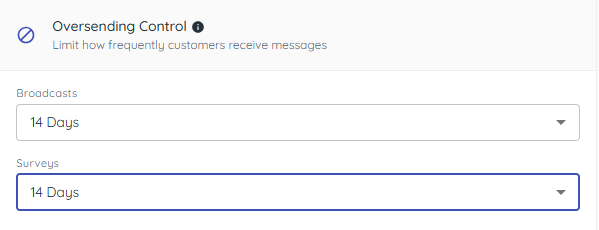
You’ll see the days between broadcasts per recipient (default 14, up to 90, or none).
This prevents sending too frequently to the same person.
2. Understand recommendations
1) Use 14 days for most stores.
You’ll see fewer unsubscribes due to fatigue.
3. Configure email settings
1) Go to Settings > Email and fill in Reply To Email, Email Sender Name, Reply To Name, and make sure the footer has an unsubscribe link.
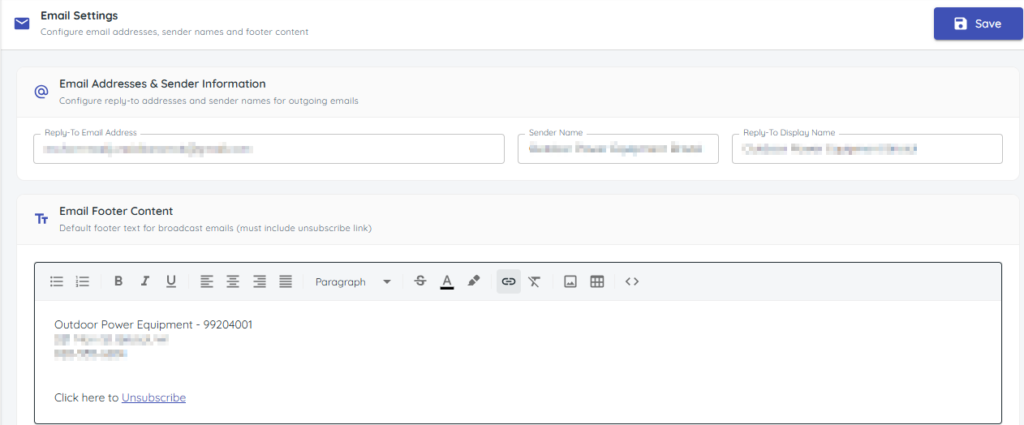
You’ll see a yellow warning when unsubscribe is missing.

These fields are required before email broadcasts can be sent.
4. Using HTML Templates for emails
1) When editing email broadcasts, click the double-caret buttons and paste an HTML Template.
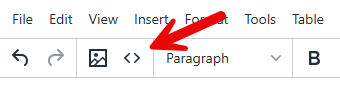
This allows full control over layout, images, and styles.
HTML can make emails look more professional.
Tips to Work Faster
– Keep your email footer compliant with an unsubscribe link at all times.
Related KB articles
– Create a new broadcast (SMS, MMS, Email)
– Scheduled, send, and delivery rate for Broadcasts